Dead rooms in the house
The back bedroom or the upstairs office drops to one bar, and video calls freeze.
Independent Starlink installers. We are not the Starlink company; we install and set up Starlink systems as a local service.Independent Starlink installers. We are not the Starlink company.Independent Starlink installers. Not the Starlink company.
We are not DISH Network. Booked a Starlink installation through DISH? Please contact DISH directly.We are not DISH Network. DISH installation? Please contact DISH directly.Not DISH Network. DISH install? Contact DISH.


Home/Whole-Property Wi-Fi & Networking
Starlink's router covers a typical house, but not a 40-acre property with a shop, barn and guest house. We design and install Starlink mesh Wi-Fi, indoor and outdoor access points, wireless bridges and backup (failover) connections so you get a strong, reliable signal where you actually need it, and then we test every building to prove it.
Does this sound familiar?
Starlink itself is usually fine. The problem is getting the connection from the router to every place you need it.
The back bedroom or the upstairs office drops to one bar, and video calls freeze.
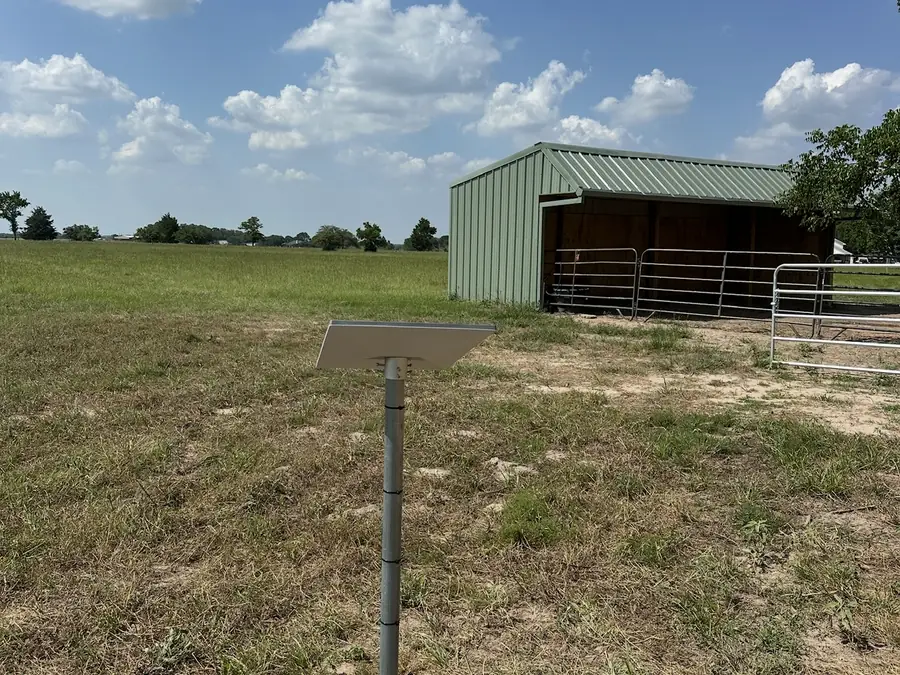
The workshop or barn is a few hundred feet away and gets nothing at all, especially inside a metal building.
The guest house, RV pad or pool area sits just outside the router's range.
Security cameras and gate openers at the edge of the property lose their connection.
A plug-in extender from the store gives you more bars but not more speed.
Full speed in the living room, a fraction of it everywhere you actually work.
Starlink mesh Wi-Fi setup
Mesh units inside the house, cabled links to nearby buildings and wireless bridges for the far ones. We use the simplest setup that works.
Starlink mesh routers add extra Wi-Fi points that work as one seamless network. We place them where they cover dead spots without slowing the network down, and we connect them by cable wherever possible for the best speed.
Searching for the best Wi-Fi extender for Starlink usually means one room or building has weak signal. Here's the honest answer:
We'll recommend the simplest setup that works and tell you what you don't need.
From the workshop to the RV pad, we make sure every building you use has reliable internet for work, streaming and calls.
Security cameras, gate openers, feeders and well monitors all need a steady connection. We make sure your outdoor devices are covered and on a reliable network.
Big spaces need more than one router. We install indoor and outdoor access points, wired back with CAT6 wherever possible, to cover large homes, open ground, shops and warehouses with one seamless network.
Already have cable, fiber, DSL or cellular internet? We configure a dual-WAN router that combines it with Starlink. Use both at once for load balancing, or keep Starlink as an automatic backup that takes over the moment the other connection drops, which is ideal for home offices and businesses that can't go offline.
Coverage options
The right option depends on how far away the building is and what's between it and the house.
| Option | Best for | How it connects |
|---|---|---|
| Starlink mesh unit | Dead spots inside the house | Wirelessly, or by cable for the best speed |
| Mesh unit on an Ethernet run | A shop, office or guest house nearby | A buried or protected Ethernet cable from the house |
| Outdoor access point | Yards, RV pads, pools and gates | Mounted outside to cover open ground |
| Point-to-point wireless bridge | Barns and buildings far from the house | A pair of antennas aimed at each other, like an invisible cable |
| Dual-WAN failover router | Home offices and businesses that can't go offline | Combines Starlink with another provider for load balancing or automatic backup |
Not sure which you need? We walk the property, test the signal where you need it and recommend the simplest option that works.
Our process
We walk the property and test the signal where you need it.
We recommend mesh, extenders or a wireless bridge.
We install and connect everything.
We run a speed test in every building and fine-tune placement and settings.
Need a better dish position first? See the right mount for a clear view of the sky →
Free coverage plan
Every property is laid out differently, so we plan the coverage first and quote it free before any work starts. Your plan can include:
Not sure what you need? Get a free quote, and we'll recommend the simplest setup that works.
People also ask
The questions people ask most about Starlink Wi-Fi coverage, mesh and extenders.
Starlink's Gen 3 router covers up to about 3,200 square feet under ideal conditions, according to Starlink's specifications. Walls, floors and metal buildings reduce that. Past the house, standard Wi-Fi fades quickly outdoors, so outbuildings are usually connected with an Ethernet run (up to 328 ft per run) or a point-to-point wireless bridge.
FCC Broadband Speed Guide, per activity at the same time. Add them up for everyone at home, then make sure the Wi-Fi reaches every room and building where they happen.
Find where you're losing signal, then match it to the option below.
| Where the signal drops | Best option |
|---|---|
| A room or two inside the house | Starlink mesh unit, wired if possible |
| An office, shop or guest house nearby | Ethernet run to a mesh unit or access point |
| A building you can't trench to | Point-to-point wireless bridge |
| Yard, RV pad, pool or gate | Outdoor access point |
| Whenever your main internet goes down | Dual-WAN failover with Starlink as backup |
Wi-Fi questions
Starlink's Gen 3 router covers up to about 3,200 square feet under ideal conditions, according to Starlink. Walls, floors and metal buildings reduce that, which is where mesh units and wired access points come in.
Yes. Starlink routers have a bypass mode for a third-party router, and the Gen 3 router's Ethernet ports can feed another router or access point. We set up whichever gives you the best coverage.
Starlink's router covers a typical house, but thick walls, metal buildings and distance all weaken the signal. Adding a mesh unit, ideally connected by cable, usually fixes dead spots inside the house.
Inside the house, a Starlink mesh unit is usually best. For a building up to a few hundred feet away, a mesh unit on an Ethernet run or an outdoor access point. For far outbuildings, a point-to-point wireless bridge.
Yes. We link outbuildings with cable, an outdoor access point or a wireless bridge, depending on the distance and what's in the way, then run a speed test in every building.
A well-aimed point-to-point bridge with a clear line of sight carries the connection between buildings like an invisible cable. We test the speed in each building before we leave.
Yes. Security cameras, gate openers, feeders and well monitors all need a steady connection. We make sure your outdoor devices are covered and on a reliable network.
Yes. We configure dual-WAN routers that combine Starlink with cable, fiber, DSL or cellular internet. Use both at once for load balancing, or set Starlink as an automatic backup that takes over when the other connection drops.
Yes. We install indoor and outdoor access points, wired back with CAT6 where possible, to cover large homes, shops and warehouses, then test coverage and speed across the space.
It depends on how many rooms and buildings you need covered and how far apart they are. We plan the coverage first and give you a free quote before any work starts.
Call 512-745-6178 for a free quote.